Feature · Time-Lords

Four time-lord systems, one age slider.

Astrolium's Time-Lords module reads annual profections, Zodiacal Releasing, Firdaria and Valens' decennials from one natal chart, for any age from 0 to 120.

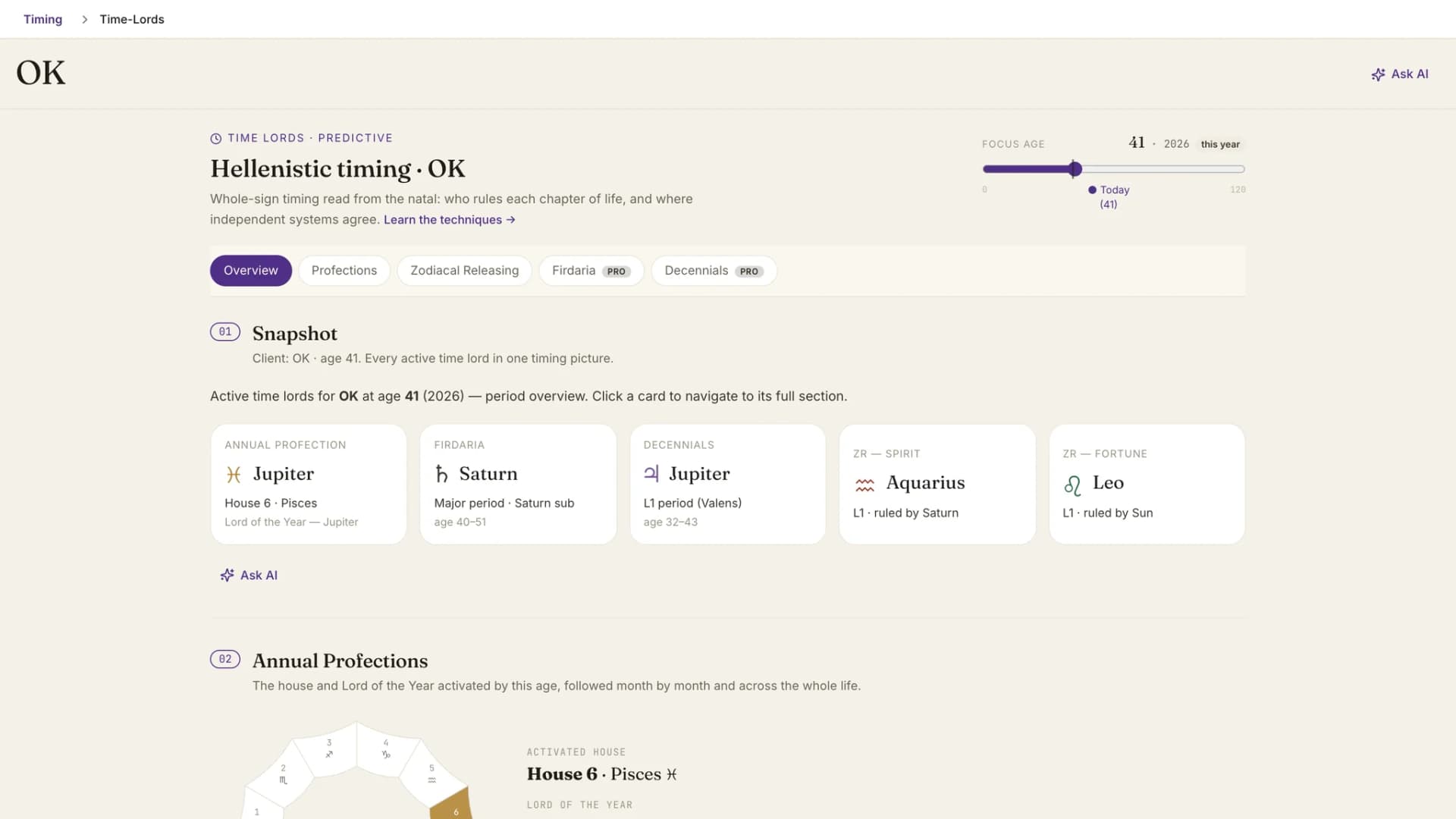
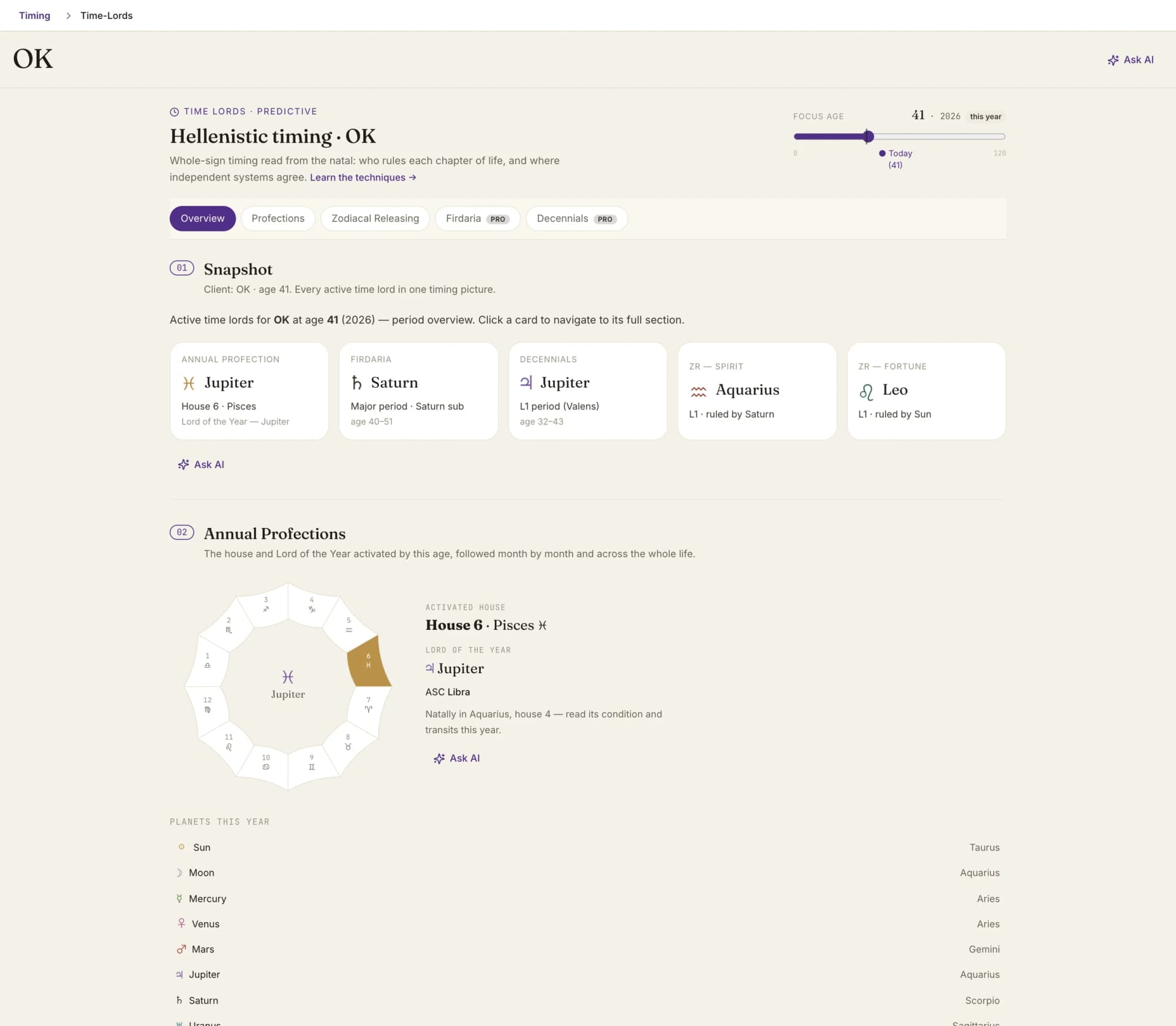
Time lords in one place: annual profections, firdaria, decennials and zodiacal releasing for the current period

By Oleg Kopachovets · Updated September 23, 2026

01

Profections, Zodiacal Releasing and Firdaria tend to live in separate reports, and each one asks for the same birth data again.

02

Comparing systems means lining up ages by hand across printouts, which is exactly where a reading slips by a year.

03

Firdaria is only correct when the sequence follows sect. A day and night mix-up is easy to miss on a plain table.

04

Decennials depend on the order of the seven classical planets in the chart, which is slow to work out by hand for every client.

Capabilities

What you can do with our time lord astrology software

One focus age for every system

A slider from 0 to 120 sets the year of life. Profections, releasing, Firdaria and decennials all move with it, and Jump to the present brings you back.

Profections by year and by month

The activated whole-sign house and Lord of the Year, a monthly strip that starts at the birth month, and a year-by-year view across the whole life.

Releasing from Spirit or Fortune

Switch the lot with one toggle. Peak periods on the angular signs are marked, Loosing of the Bond is flagged, and each L1 chapter opens into its L2 sub-periods.

Firdaria that reads sect first

Day charts get the day sequence and night charts the night sequence. Major lords open into sub-periods; the nodal periods are labelled as having none.

Valens' decennials

The seven classical planets in the order they stand in the chart, 10 years 9 months per major period, with sub-periods listed in months.

Only the techniques you use

Pick the methods in Settings under Time-Lord Methods. Switched-off techniques leave the page; the Snapshot overview always stays.

How time lord astrology software works in Astrolium

  1. Step 01 / 03

    Open a client

    The module opens on the client's current age, so the first thing on screen is the Snapshot of every active time lord for today.

  2. Step 02 / 03

    Move the focus age

    Drag the slider to any year of life. Each section re-reads that age, so the profected house, the ZR chapter and the planetary lords always describe the same year.

  3. Step 03 / 03

    Open a section and ask

    Click a Snapshot card to jump to its full section. Every section has an Ask AI button that sends the periods on screen, not a blank question.

In the app

The real time lord astrology software screen, not a mockup

Time lords in one place: annual profections, firdaria, decennials and zodiacal releasing for the current period

Astrolium's Time-Lords module puts four classical timing systems on one screen for one client: annual profections, Zodiacal Releasing from Spirit and Fortune, Firdaria and Valens' decennials. A single focus-age slider drives all of them. Time-Lords is part of the $11 per month Pro plan and is also included in Astrolium Personal; see pricing.

To try one technique at a time first, use the free profections calculator, the zodiacal releasing tool or the firdaria calculator.

What the Time-Lords module does

Time-lord techniques hand each stretch of a life to a planet, and a reading gets firmer when independent systems name the same one. Astrolium's Time-Lords module computes four of these systems from a client's natal chart and lines them up by age. Annual profections give the activated whole-sign house and the Lord of the Year, month by month and across the whole life. Zodiacal Releasing runs from the Lot of Spirit or the Lot of Fortune, marks peak periods on the angular signs and flags Loosing of the Bond. Firdaria follows the Persian sequence for a day chart or a night chart, with major lords and their sub-periods. Decennials follow Valens: the seven classical planets in the order they stand in the chart, ten years and nine months each. A Snapshot at the top shows every active lord for the chosen age, and one Ask AI button asks where the systems agree.

One age, four clocks

The header carries a focus-age slider from 0 to 120 and a Jump to the present button. The module opens on the client's current age, so the first screen is today. Move the slider and every section follows. The profected house, the ZR chapter, the Firdaria lord and the decennial distributor all describe the same year of life, which is the whole point of reading them together.

The Snapshot sits above the sections with one card per system: the annual profection with its house, sign and Lord of the Year; the Firdaria major period and its current sub-lord; the decennial L1 period; and ZR from Spirit and from Fortune, each with its ruler. Click a card and the page jumps to that technique.

Which sections appear is up to you. Settings has a Time-Lord Methods selection with all four techniques. Switch one off and its section leaves the page. A practitioner who never reads decennials does not scroll past them.

Annual profections

This is the section with the most detail. A profection ring shows the activated house and the Lord of the Year. Below it, the module lists the natal planets in the activated sign and tells you where the Lord of the Year sits natally, with a reminder to read that planet's condition and its transits for the year.

Two strips extend the view. The monthly strip walks the activated sign and its lord forward one month at a time, starting from the birth month. The year-by-year strip shows which house each age activates across the whole life, so the next return to the first or the tenth is visible without counting on your fingers.

Then there is a degree-based layer. Astrolium requests the profected positions for the year from AstroAPI and lists their aspects to the natal chart, with the rows that touch the Lord of the Year marked. It sits next to the whole-sign activation and does not replace it. The annual profections guide walks through a full delineation.

Zodiacal Releasing from Spirit and Fortune

A toggle switches the releasing lot. The L1 bar runs across the life in sign periods: peak periods on the angular signs carry a triangle, and Loosing of the Bond carries its own marker. Select an L1 chapter and the L2 sub-periods within that sign open underneath, each with its ruler, plus a short interpretation note for the sub-period the focus age falls in.

Read the zodiacal releasing guide for how peaks and the bond are interpreted.

Firdaria

Firdaria is the Persian period system, and the module reads the natal sect before it draws anything. A day chart gets the day sequence. A night chart gets the night sequence, and the period lengths follow from that choice. Each major lord opens into its L2 sub-periods. The nodal periods have no sub-periods, and the section labels them that way instead of inventing a split.

Decennials

Decennials come from Vettius Valens. The section names the starting planet, then runs the seven classical planets in the order they stand in the chart. Each major period lasts 10 years 9 months, 129 months in all, and its sub-periods are listed by month.

That order needs all seven planets. If one of them is turned off in Settings under Chart Points, Astrolium says so and does not guess the active lord.

Outside the module

The per-client transits view carries a compact strip of the active time lords for today: profection, Firdaria, decennials, and ZR from Spirit and Fortune, always in that order. It opens the full module in one click. If the timing service has a problem, the strip hides itself rather than break the transit screen.

Ask AI with the periods attached

Every section has an Ask AI button, and each one sends the computed periods rather than a generic question. The profection prompt carries the activated house, the Lord of the Year's natal sign, any activated natal planets, and the tightest degree-based aspects that touch the lord. The Snapshot button asks the AI assistant to synthesise the verified active lords at that age and say where they agree.

When a calculation fails

The periods come from Astrolium's timing service. If it returns an incomplete result, the section says the calculation is unavailable and offers a retry. No locally computed stand-in is drawn in its place. When a refresh fails after an earlier success, the last verified result stays up with a note saying so.

The Report button in the header opens either the built-in multi-page Astrolium PDF or Report Studio, where you build a custom report in your own voice. More on both in PDF reports.

How it fits with the rest of Astrolium

Predictive timing describes the layered method: profections for the year, releasing for the chapter, transits for the day. Time-Lords is where the first two live in full, next to Firdaria and decennials. For sect, dignities and the Hermetic lots, see the Hellenistic astrology suite. For single-chart checks without a client file, the profections calculator, zodiacal releasing tool and firdaria calculator stay free.

Frequently asked questions

Which time-lord techniques does the module include?
Four: annual profections, Zodiacal Releasing from the Lot of Spirit and the Lot of Fortune, Firdaria, and Vettius Valens' decennials. All four are computed from the client's natal chart and read at the same focus age. A Snapshot at the top lists the active lord from each system for that age, and each card links to the technique's full section.
Is Time-Lords part of Pro or Astrolium Personal?
Both. Time-Lords is included in the Pro plan at $11 a month and in Astrolium Personal. Firdaria and Decennials carry a Pro badge in the section list. An account without that access sees an upgrade panel in those two sections, and the periods are not computed behind it.
Can I hide the techniques I don't use?
Yes. Settings has a Time-Lord Methods selection with all four techniques. Turn one off and its section disappears from the module. The Snapshot overview is always shown, so even with every technique switched off you keep a summary screen.
Why does the decennials section ask me to change Chart Points?
Decennials follow the order in which the seven classical planets stand in the chart. If any of them is switched off in Settings under Chart Points, Astrolium cannot build that order, so it shows a note instead of guessing the active lord. The chip in the time-lords strip opens that setting directly.
How is the module different from the free calculators?
The free profections, zodiacal releasing and firdaria calculators each run one technique for one birth chart. The module runs four techniques, decennials included, for a saved client and keeps them on the same age. It also adds the Snapshot overview, the time-lords strip in Transits, Ask AI on every section and the report menu.

Get Four time-lord systems, one age slider. as part of Astrolium

One subscription covers every feature. 5 free client profiles, no card required.