Feature · Human Design

Human Design, past the Type and Strategy card.

Astrolium's Human Design workspace holds the BodyGraph, centers, channels, activations, transits, PHS, cycles and a pair chart on one saved birth record.

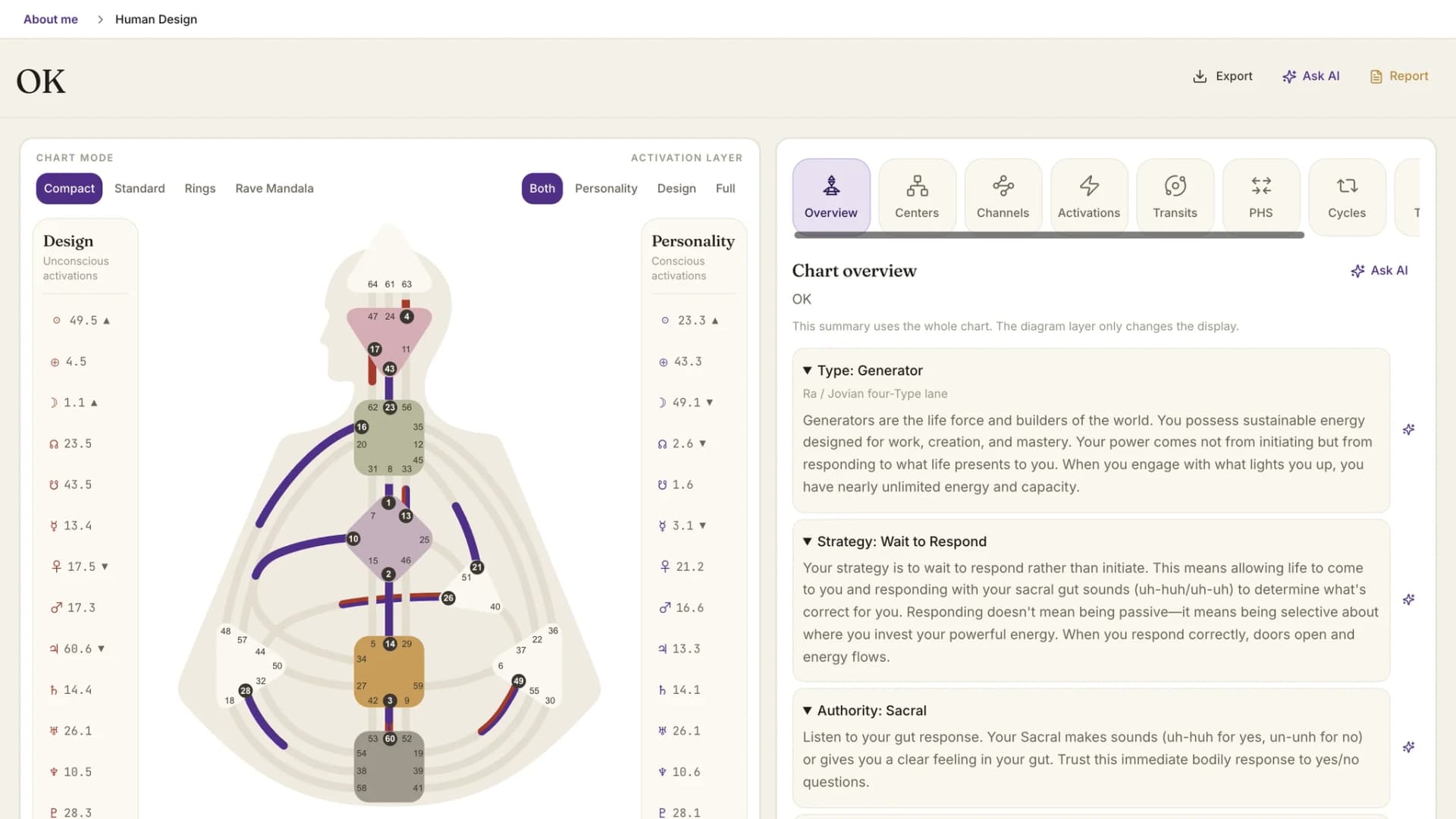
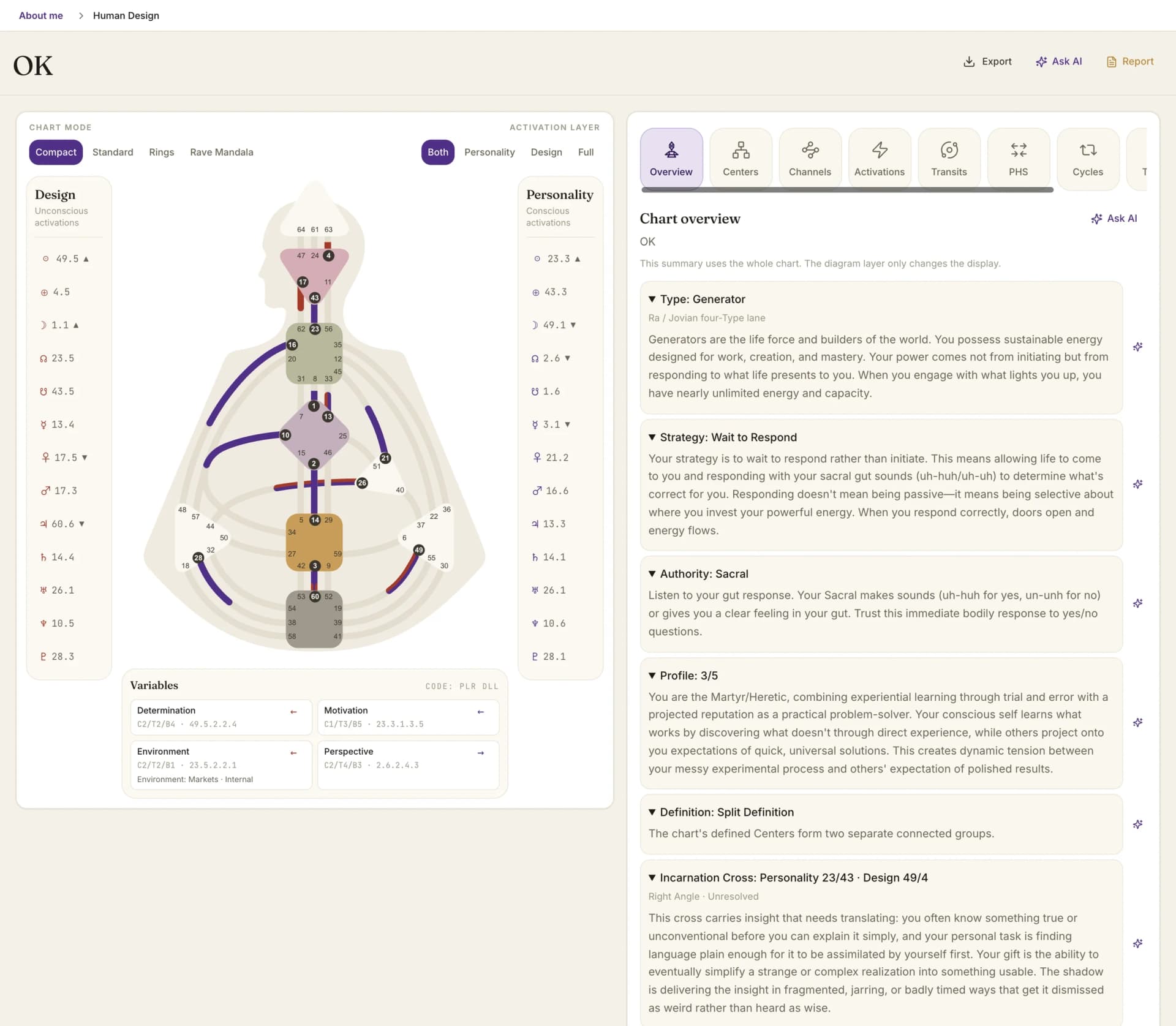
The Human Design workspace: BodyGraph with Design and Personality activations beside the chart overview

By Oleg Kopachovets · Updated September 16, 2026

01

Free bodygraph sites give you Type, Strategy and Authority, then stop exactly where the reading starts.

02

Nothing keeps a client's BodyGraph beside their natal chart, so two systems mean two tools and two copies of the birth data.

03

Pair readings get reduced to a percentage, which tells a couple nothing they can act on.

04

Variables and PHS are usually presented as diet and lifestyle instruction, which is not a claim any practitioner should be repeating.

Capabilities

What you can do with our human design software

Core mechanics, then the rest

Type, Strategy, Authority, Profile and Definition sit at the top, with the Incarnation Cross and its angle named as Right Angle, Juxtaposition or Left Angle. Manifesting Generator is shown as a Generator-family subtype, not a fifth Type.

Nine centers, thirty-six channels

Centers and Channels are separate tabs, each gate explained where it sits. Four chart modes render the same calculation: Compact, Standard, Rings and the Rave Mandala, in conscious and unconscious layers.

Transits on a saved chart

Pick a UTC moment and read the temporary activations against that person's natal baseline: transit gates, natal-plus-transit channels, newly defined centers. The saved chart's Type, Strategy and Authority never change.

Cycles as exact passes

Solar Return, Lunar Return, Saturn Return, Uranus Opposition and Chiron Return, each as dated exact passes with direct and retrograde motion, plus a chart for the first pass beside the saved one.

Pair chart without a score

Two saved people, one combined BodyGraph. Channel contacts are categorised as Electromagnetic, Companionship, Dominance or Compromise, with contact counts and combined center definition. There is no compatibility percentage anywhere in it.

PHS in observation language

Determination, Environment, Motivation and Perspective are presented for observation, not prescription. The screen states in plain words that none of it is medical, dietary or nutritional advice.

How human design software works in Astrolium

  1. Step 01 / 03

    Pick the person

    Yourself or anyone on your roster. Human Design needs an exact, reliable birth time, so a chart with an unverified Rodden rating is refused rather than approximated.

  2. Step 02 / 03

    Read across the tabs

    Overview, Centers, Channels, Activations, Transits, PHS, Cycles, Timing, Pair. Every tab reads from the same calculation, so nothing recomputes behind your back.

  3. Step 03 / 03

    Take it out of the app

    Save a PDF of the chart or the pair sheet, or build a client document in Report Studio from the full and pair recipes. Sky answers questions grounded in the facts on screen.

In the app

The real human design software screen, not a mockup

The Human Design workspace: BodyGraph with Design and Personality activations beside the chart overview

Astrolium keeps a client's BodyGraph on the same record as their natal chart, then gives it nine tabs instead of a summary card. Type and Authority are where a reading starts, not where the software should stop.

For a free single chart, run the Human Design calculator. For the system itself, read the Human Design guide. For the daily gate picture without an account, use Human Design transits.

What the workspace holds

Astrolium's Human Design module is a nine-tab workspace on a saved birth record: Overview, Centers, Channels, Activations, Transits, PHS, Cycles, Timing and Pair. The Overview names Type, Strategy, Authority, Profile, Definition and the Incarnation Cross with its angle. Centers and Channels break down every defined and open circuit; Activations lists the conscious Personality and unconscious Design sides. Transits read any UTC moment against the saved chart and show temporary channels and newly defined centers. Cycles gives exact passes for Solar, Lunar, Saturn and Chiron returns plus the Uranus opposition. The Pair tab builds a combined BodyGraph for two saved people, sorting contacts as Electromagnetic, Companionship, Dominance or Compromise, with no compatibility score. PHS stays in observational language. Charts export to PDF, and Report Studio carries a full recipe and a pair recipe for client documents.

Human Design sits awkwardly in most astrology software. It borrows planetary positions but reads them through a different diagram, so tools either ignore it or hand it off to a separate site. Astrolium treats it as a module on the same client record: one birth entry, one place to correct a time, one roster.

Overview and the chart itself

The top of the screen is core mechanics. Type, with Manifesting Generator shown as a Generator-family subtype rather than a separate Type. Strategy in the phrasing that belongs to it, from waiting to respond through informing before acting. Authority, whether Sacral, Solar Plexus, Splenic, Ego, Self-Projected or Mental. Profile, Definition from single through quadruple split, and the Incarnation Cross with its angle named.

The BodyGraph renders in four modes from the same calculation. Compact for a quick look, Standard for the familiar nine-center diagram, Rings for the planetary ordering, and the Rave Mandala for the zodiacal frame. Design activations are drawn as the unconscious layer, Personality as the conscious one, each row reading as planet, gate and line.

Centers, channels, activations

Each of the nine centers gets its own reading: defined or open, and which channels produce that state. Channels list both gates with the explanation of the circuit they sit in. The Activations tab is the raw list, 26 placements across Design and Personality, with colour, tone and base substructure available where the calculation returns it.

Transits and Cycles

Transits works on a moment, not on a vague "today". Enter a date and time in UTC, and the tab returns the transit gate activations, the channels they complete against natal gates, and the centers that come into temporary definition. The heading is explicit that this is a temporary layer over a fixed chart.

Cycles handles the returns in Human Design terms. Five kinds are supported: Solar Return, Lunar Return, Saturn Return, Uranus Opposition and Chiron Return. Each is listed as an exact pass with its instant and its motion, direct or retrograde, and the first pass renders as a chart you can set beside the saved one. Passes already behind the reference date are marked past; if none has occurred, the next upcoming one is shown instead.

The Pair tab

Two saved people, 2 charts, one combined BodyGraph, and no percentage.

Every channel contact is classified. Electromagnetic is one gate each, the classic attraction-and-friction contact. Companionship is the same channel defined in both charts. Dominance is a whole channel held by one person. Compromise is the awkward one, where the contact exists but the circuit runs unevenly. Contact counts appear beside each category with a note that counts describe channel contacts and not relationship quality.

Center definition is shown for the pair: filled means defined, outline means undefined, and a highlight marks a center that becomes defined only when the two are together, labelled as newly defined together rather than a shared authority. Under it all sits a reflection line stating that Human Design is a symbolic self-observation system, not scientifically established, and that each person keeps their own decision process.

The free Human Design compatibility calculator covers the same mechanics for people without an account.

PHS, Variables and the line that does not get crossed

The PHS tab carries Determination, Environment, Motivation and Perspective with the provider notation behind each. The copy is observational throughout: notice ordinary intake conditions without changing what or when you eat; notice whether a view and distance from bustle help you observe. Environment carries its own note that it is a lens for spaces you already use, not advice to relocate or pick a city.

The health notice is not buried. Determination is stated as not diet, medical or nutritional advice, with a direct instruction to consult a clinician where a health condition, eating disorder or prescribed diet is involved. Variables are also flagged as time-sensitive, so an approximate birth time makes them provisional.

Out of the app

Both the single chart and the pair sheet export as PDF. Report Studio carries two Human Design recipes, one for a full individual reading and one for a pair, so a client document is assembled from the calculated facts rather than retyped. Sky, the AI assistant, answers questions scoped to what is on screen, and its Human Design prompts explicitly forbid medical claims and guaranteed events.

For the reading method, the Human Design guide is the long-form companion. For what each plan includes, see pricing.

Frequently asked questions

Does Astrolium give a Human Design compatibility score?
No, and that is deliberate. The pair chart names which channels connect the two people and sorts each contact as Electromagnetic, Companionship, Dominance or Compromise, then shows which centers become defined together. Counts describe channel contacts, not relationship quality. A single number would flatten all of that into something a couple can argue about but not use, so the module does not produce one.
Which plan includes Human Design?
Pro, at $11 per month, and every tier above it. The module moved down from the Master tier in September 2026, so practitioners on Pro now have the full workspace rather than a preview of it. Human Design is also part of Astrolium Personal for people reading their own chart. The [pricing page](/pricing) lists what each plan carries.
Why does it refuse a chart without an exact birth time?
Human Design places 26 activations by planetary position, and the Design side is calculated from a point about 88 degrees of solar arc before birth, roughly 3 months earlier. A shifted time moves gates, lines, Profile and sometimes Authority. Rather than compute from a substituted noon and present the result as fact, the module asks for a verified time or a rectified one. Charts flagged unreliable in the Rodden rating are blocked.
Can I see today's transits on a client's BodyGraph?
Yes. The Transits tab takes any date and time in UTC and shows the temporary gate activations for that moment, the channels formed between transit and natal gates, and the centers those channels newly define. The panel states that these activations are temporary and do not alter the saved chart's Type, Strategy or Authority.
What is in the PHS and Variables tab?
Determination, Environment, Motivation and Perspective, with the provider's colour, tone and base notation shown behind each. The wording throughout is observational: notice how you already eat, notice the spaces you already use. It carries an explicit notice that it is not medical or nutritional advice and does not diagnose or treat anything.

Get Human Design, past the Type and Strategy card. as part of Astrolium

One subscription covers every feature. 5 free client profiles, no card required.