Feature · Planetary returns

Every exact pass, not just the first one.

Astrolium's planetary returns module lists every exact Venus return pass across 12 months, direct and retrograde, and opens any pass as a natal biwheel.

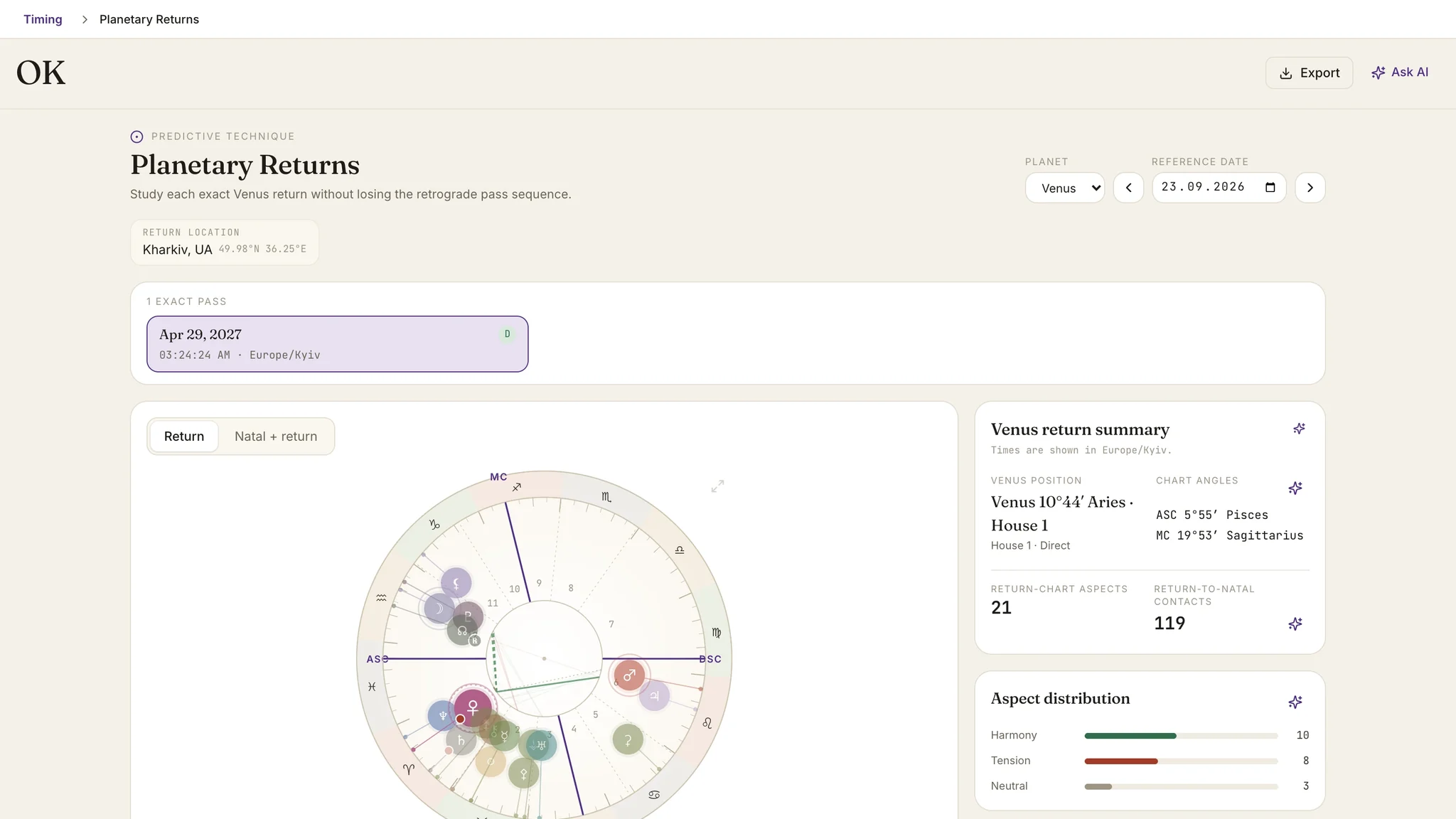
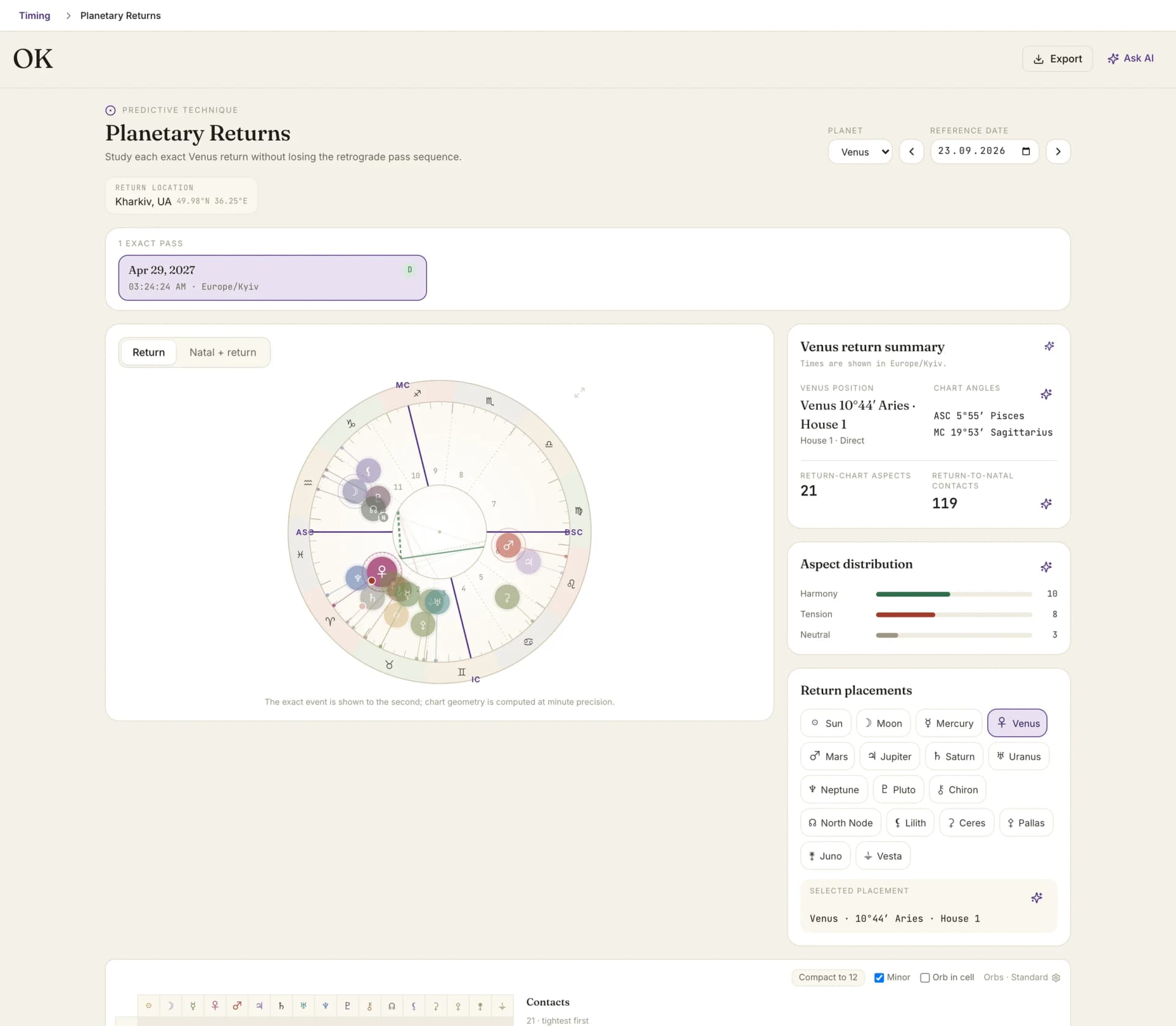
Planetary returns: the Venus return timeline for the year and the return chart for the selected pass

By Oleg Kopachovets · Updated September 16, 2026

01

Most software solves a return once and hands back a single chart, as though the body crossed the degree once.

02

When the planet stations retrograde near the natal degree, that single answer is the least useful of the three.

03

Return work usually means re-entering the same birth data in a second screen and picking a relocation city by hand.

04

A return chart on its own says little; the reading lives in how it lands on the natal chart.

Capabilities

What you can do with our planetary returns astrology software

The whole pass sequence

Exact passes are listed as a sequence, each labelled direct, retrograde or stationary. A triple return shows as 3 charts of one event rather than one chart and two omissions.

Exact to the second

The return instant is reported to the second, with the chart geometry computed at minute precision, and every time shown in the timezone of the return location rather than a silent UTC.

Biwheel or single wheel

Read the return on its own, or set it around the natal chart. The wheel separates three layers: the return, the natal, and the return-to-natal contacts between them.

Contacts under your orbs

Return-chart aspects and return-to-natal contacts are listed separately, both under the orb settings you already work with. When nothing falls inside them, the panel says so instead of widening quietly.

Return location, deliberately chosen

Set where the return is cast, then read the return ASC and MC as their own section. Relocating a return is a judgement call, so it is an explicit field rather than a default nobody notices.

Scoped questions

Ask the AI assistant about the return summary, a single placement, the angles, the aspect distribution, or the return-to-natal contacts. Each question carries only the facts from that panel.

How planetary returns astrology software works in Astrolium

  1. Step 01 / 03

    Pick the client and a reference date

    The module reads the saved birth record. An exact birth time and coordinates are required, since the return angles and houses are the part that moves fastest.

  2. Step 02 / 03

    Step through the passes

    Previous and next return move along the sequence. Each exact pass is numbered and marked direct or retrograde, so a retrograde stretch reads as one event with several crossings.

  3. Step 03 / 03

    Open the pass you want to read

    Switch to the biwheel, work the return placements, angles, aspect distribution and return-to-natal contacts, and ask Sky about any panel on screen.

In the app

The real planetary returns astrology software screen, not a mockup

Planetary returns: the Venus return timeline for the year and the return chart for the selected pass

Astrolium treats a return as a sequence rather than a moment. Every exact pass is listed with its motion, and any pass opens as a biwheel against the natal chart.

For a single free answer, run the Venus return calculator. For the return method in general, the solar return guide covers the reasoning that carries across bodies.

What the module does

Astrolium's planetary returns module solves the moments a planet comes back to its natal longitude and lists them as a sequence of exact passes rather than a single chart. Venus is the enabled planet in this release, with the module architected to take further bodies. Each pass is numbered and marked direct, retrograde or stationary, so a triple return reads as one event with three crossings. The exact instant is reported to the second, the chart geometry is computed at minute precision, and times are shown in the timezone of the chosen return location. Any pass opens as a single wheel or as a natal biwheel with three separated layers: return, natal, and the return-to-natal contacts. Return placements, chart angles, aspect distribution and return-to-natal contacts each get their own panel, and each one can be sent to the AI assistant on its own.

Return work has a structural problem that most software inherits without noticing. The solver is written to find one root: the instant the planet's longitude matches its natal value. That is correct for the Sun, which never turns retrograde. For every other body it can be wrong in an interesting way.

Why the pass sequence matters

Venus stations near the natal degree often enough that the single-answer approach fails regularly. When it does, the planet crosses the degree going forward, crosses back over it during the retrograde, then crosses a third time on the way out. Three exact contacts, weeks or months apart, and a single-chart tool shows you one of them with no indication that the other two exist.

The module lists them all. Pass 1 direct, pass 2 retrograde, pass 3 direct, each with its instant. The reading is the shape of the sequence: what began at the first crossing, what came back at the second, what settled at the third.

The chart around the pass

Select a pass and the wheel fills. Two views are available, a single return wheel and a natal biwheel, and the biwheel keeps its three layers visually distinct: the return chart, the natal chart, and the contacts running between them.

Four panels carry the detail:

  1. Venus position and return placements. Where the returning body sits, and the rest of the return chart around it.
  2. Chart angles. The return Ascendant and Midheaven, read against the location you chose.
  3. Return-chart aspects. The internal structure of the return, under your orb settings.
  4. Return-to-natal contacts. The part most readings live on. When nothing falls inside your active orbs, the panel says there are no contacts rather than quietly widening.

An aspect distribution summary splits the chart into harmony, tension and neutral, which is a fast way to characterise a return before reading it closely.

Location is a decision, not a default

Where a return is cast changes its angles and houses completely, and schools disagree about whether to use the birthplace, the current residence or wherever the person happens to be. The module makes it a field you set. That is one more click than a default, and it is the right one, because the return ASC and MC section is where the consequences of that choice become visible.

Asking about it

Each panel has its own question. Ask about the return as a whole, about Venus in its return sign, about a single return placement, about the angles, about the aspect distribution, or about the return-to-natal contacts. The AI receives the facts from that panel and nothing else, which keeps answers anchored to the chart rather than to generic return copy.

In a working week

Some shapes this takes in practice.

The dated question. A client wants to know when the Venus year turns over. You open the module, step to the next return, and read the instant with its timezone. If the sequence shows a retrograde run, the answer is a window rather than a date, and the pass list is what lets you say so with a straight face.

The relocation question. Someone is spending the year abroad. Set the return location to where they will actually be, and the return Ascendant and Midheaven change accordingly. Reading the same pass twice, once for home and once for away, is a short and legible comparison.

The follow-up. A reading given at the first pass gets revisited at the third. Because the passes are numbered and dated on one screen, going back to the sequence six months later takes a click instead of a recalculation and a guess about which chart you originally used.

Where it sits beside the other returns

The Sun comes back to its natal degree once every 12 months and the Moon roughly every 27 days, and both have had their own screens in Astrolium for longer, covered on solar return and lunar return. This module is the one that handles bodies whose returns are not annual and clean. It exists because the interesting cases are the retrograde ones, and those need a list rather than a number.

For plan detail see pricing. For a free single calculation without an account, the Venus return calculator runs on the same ephemeris.

Frequently asked questions

Which planets does the module cover?
Venus is the enabled planet today. The module was built as planetary returns rather than as a Venus feature, with the planet as a field and the pass logic written to hold for any body, so further planets are additions rather than rewrites. Solar and lunar returns have their own long-standing screens in Astrolium, covered on the [solar return](/features/solar-return) and [lunar return](/features/lunar-return) pages.
What is a triple return?
When a planet stations retrograde close to its natal degree, it can cross that degree three times: once direct, once retrograde, once direct again. Software that solves for a single moment picks one of the three and discards the rest. This module lists all of them as numbered exact passes with their motion, so you can read the sequence as one extended event.
Do I have to relocate the return chart?
No, but you choose. Return location is a field on the screen rather than a hidden default, because relocating a return is a matter of school and of where the person actually is. The return Ascendant and Midheaven get their own section, which is where a relocation decision shows its consequences most sharply.
Why does it need an exact birth time?
The return instant itself depends only on the natal longitude of the planet, so a rough time still gives you dates. The chart around that instant is another matter: the angles and houses move by degrees within minutes, and return-to-natal contacts to the Ascendant or Midheaven depend entirely on them. The module asks for an exact time and coordinates before presenting a precise return.
Which plan includes planetary returns?
Pro, at $11 per month, and every tier above. It is also one of the modules in Astrolium Personal for people working their own chart rather than a client roster. The free [Venus return calculator](/tools/venus-return) stays available to anyone without an account.

Get Every exact pass, not just the first one. as part of Astrolium

One subscription covers every feature. 5 free client profiles, no card required.