Feature · Jyotish

A real Kundli, beside your Western charts.

Astrolium casts a Parashari Kundli with D9, D10 and D12 vargas, nakshatra padas, Graha Drishti, three-level Vimshottari daśā and Gochara with Sade Sati.

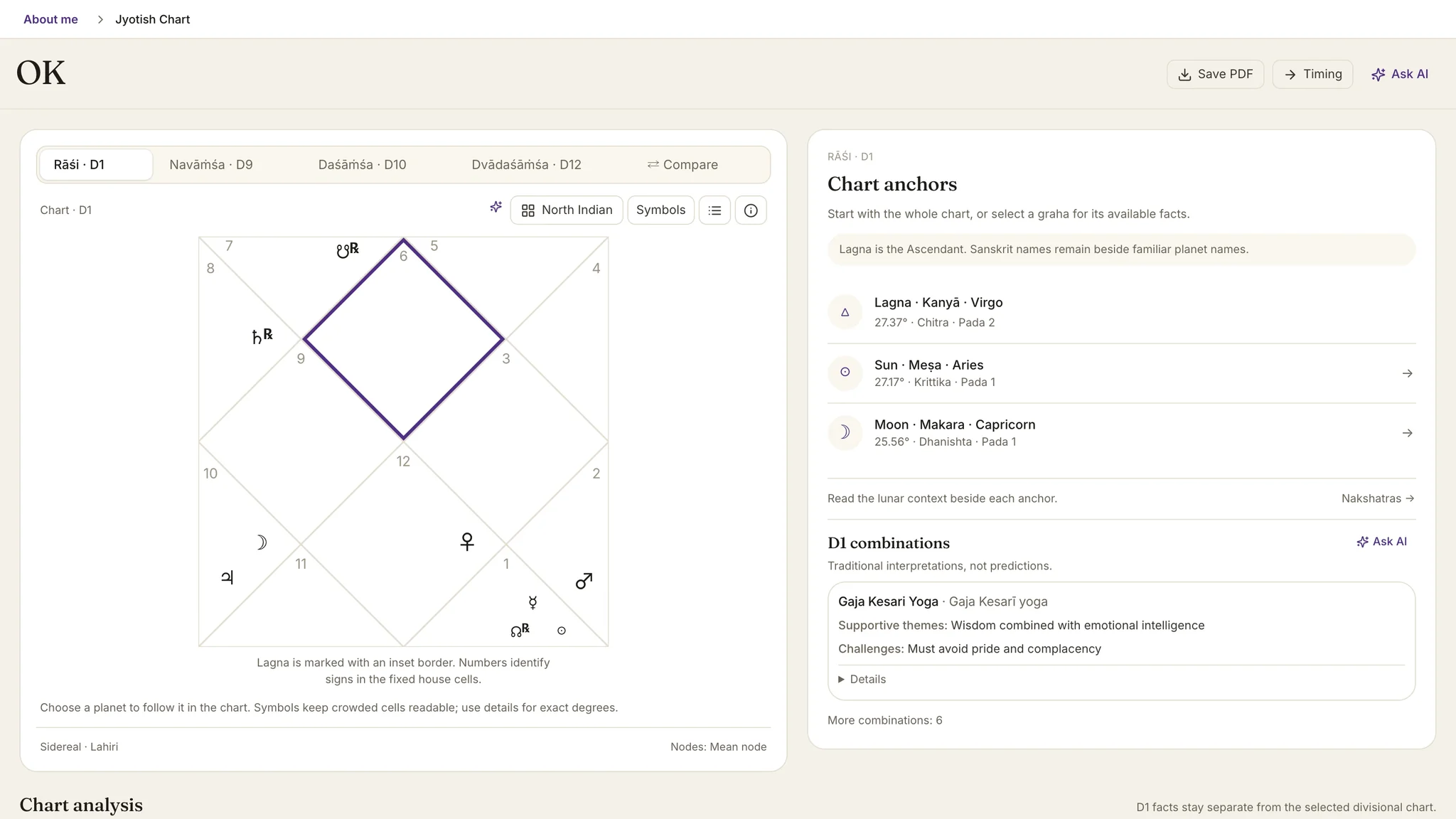
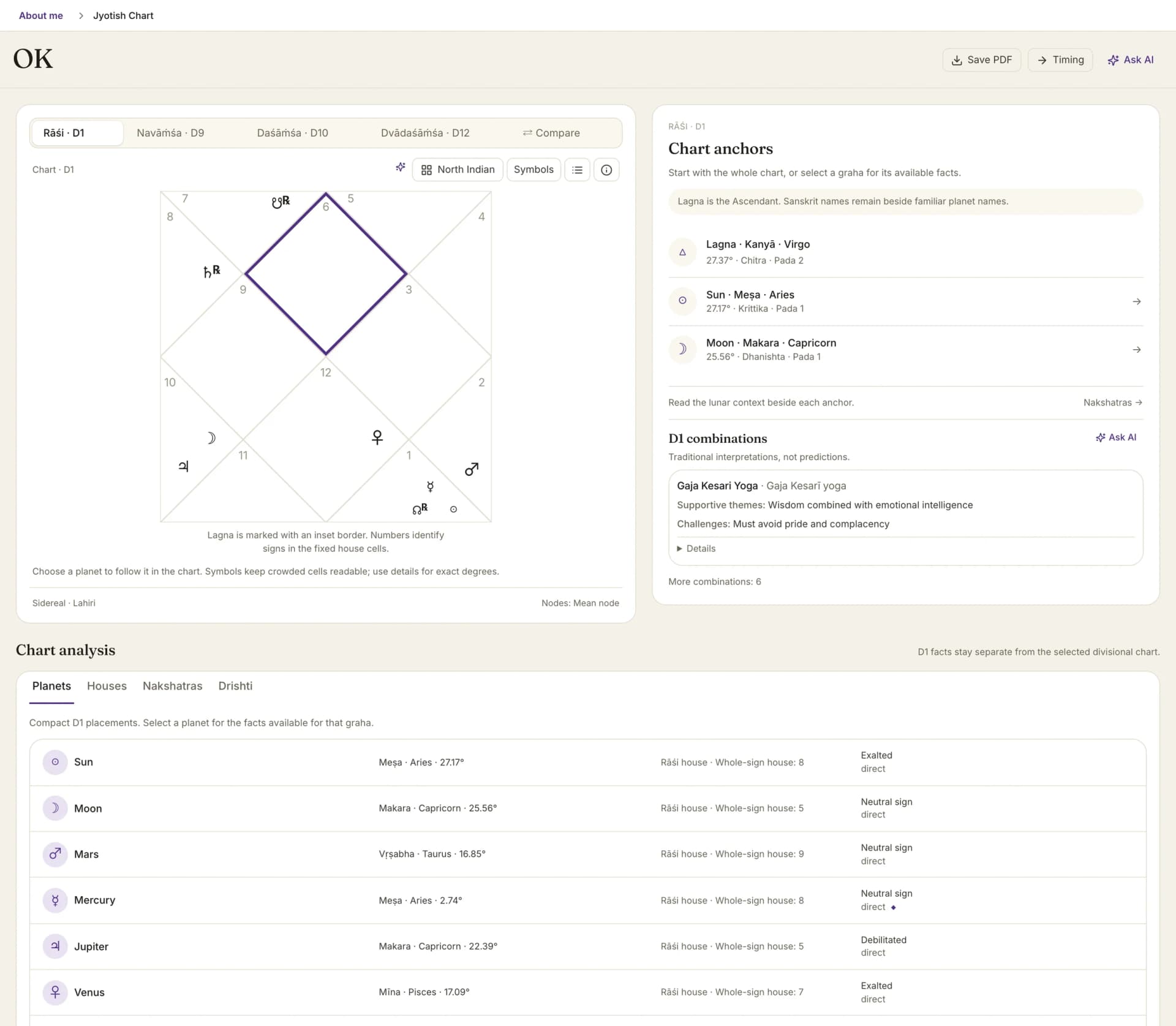
The Jyotish chart: North Indian Kundli with D1, D9, D10 and D12 tabs and the chart anchors panel

By Oleg Kopachovets · Updated September 16, 2026

01

Western software either ignores Jyotish or bolts a sidereal toggle onto a tropical wheel and calls it a Vedic chart.

02

Dedicated Jyotish packages are Windows-era desktop tools that never touch your client roster.

03

Running two programs means two birth-data entries, two places to make a typo, two sets of exports.

04

Most tools quietly substitute noon when the birth time is missing, which yields a confident chart of someone else's life.

Capabilities

What you can do with our vedic astrology software

Parashari Kundli, both plates

North Indian and South Indian styles from one toggle. The Lagna carries an inset border, planet labels switch between glyphs and abbreviations, and D1 facts stay pinned while you browse a varga.

D9, D10, D12 and Compare

Navāṁśa, Daśāṁśa and Dvādaśāṁśa render from the same calculation. The Compare view follows one graha across every divisional chart in a single column, which is how vargottama becomes visible rather than asserted.

Nakshatra, pada, dignity, drishti

Each graha carries its lunar mansion and quarter, one of seven dignity states, combustion and retrograde flags, and vargottama. Graha Drishti is computed on the Rāśi chart and does not drift when you change the varga on screen.

Vimshottari to three levels

Mahādaśā, Antardaśā and Pratyantardaśā with the balance at birth taken from the Moon's exact degree. Boundaries use the birth-place civil calendar, and near-boundary charts say how many minutes would change the lord.

Gochara, judged from the Moon

A transit table for any date, counted from the janma rāśi, with the house from the Lagna shown as position only. Aṣṭakavarga bindus appear for the grahas the ephemeris vendor publishes them for, and a dash means no count exists.

Withheld, not guessed

The Lagna moves through a sign in roughly 2 hours, so no birth time means no Lagna, and the module names the facts it is holding back instead of filling them from a substituted noon. Approximate times get a standing caveat on the daśā dates.

How vedic astrology software works in Astrolium

  1. Step 01 / 03

    Open the Kundli for a client you already have

    The Jyotish workspace reads the same birth record as every other module in Astrolium. No second data entry, no export and re-import.

  2. Step 02 / 03

    Work the chart, then the vargas

    Read D1 anchors, select a graha for its nakshatra, pada, dignity and received drishti, then switch to D9, D10 or D12 and open Compare.

  3. Step 03 / 03

    Move to Daśā and Gochara

    One click to the timing screen: the running Vimshottari period at three levels, the Gochara table for your chosen date, Sade Sati with its phase. Save either screen as a PDF.

In the app

The real vedic astrology software screen, not a mockup

The Jyotish chart: North Indian Kundli with D1, D9, D10 and D12 tabs and the chart anchors panel

Astrolium casts a Parashari Kundli from the same client record as the natal chart, runs D9, D10 and D12 beside it, and moves to a three-level Vimshottari daśā and a Gochara table in one click. Sanskrit terms stay in front, with familiar planet names alongside them.

For a single free chart, run the Vedic birth chart calculator. For the technique itself, read the Vedic astrology guide. For Saturn's slow pass over the natal Moon as a standalone check, use the Sade Sati calculator.

What a Jyotish workspace holds

Astrolium's Jyotish workspace is two Pro modules working from one saved birth record: Kundli and Daśā and Gochara. Kundli draws the Parashari D1 in North Indian or South Indian style, with D9, D10 and D12 divisional charts and a Compare view that follows a single graha across all of them. Every graha carries its nakshatra and pada, one of seven dignity states, combustion, retrograde and vargottama flags, and the Graha Drishti it gives and receives on the Rāśi chart. The timing module holds Vimshottari at three levels, a Gochara table judged from the natal Moon, and Sade Sati with its rising, peak and setting phases. The release is Lahiri ayanamsha, mean nodes and whole-sign houses, with an equal-from-Ascendant Bhāva column shown beside them. Remedies, matching and panchang are not part of it, and free calculators cover some of those separately.

Jyotish carries its own vocabulary, its own house logic and its own timing system. A tropical chart rendered sidereally is not a Kundli, and most Western software stops at that trick. The two modules here were built as Jyotish rather than as a sidereal setting: the chart screen is called Kundli, the timing screen is called Daśā and Gochara, and the AI assistant is instructed to stay in Jyotish reasoning rather than translate placements into Western terms.

The chart screen

The D1 plate renders in either style. North Indian seats its houses on the Lagna in fixed cells with sign numbers; South Indian fixes the signs and numbers the houses. Select a graha and the panel fills with what the calculation can support for that body: rāśi, degree, whole-sign house, Bhāva house, nakshatra and pada, dignity, and the drishti it gives and receives.

Four analysis tabs sit under the wheel: Planets, Houses, Nakshatras, Drishti. The Drishti tab states its own scope, which matters more than it sounds. Graha Drishti is always computed on D1. Switch the wheel to Navāṁśa and the drishti panel does not follow, because the aspects belong to the Rāśi chart. Rahu and Ketu are shown receiving drishti but not giving it, per the Parashari method this release implements.

Chart combinations, the yogas, are listed as D1 combinations with supportive themes and challenges split apart. Each carries a provenance label: classical tradition, modern interpretation, or disputed interpretation. Neecha Bhanga cancellation is reported as present or not reported, never as a quiet assumption. The header on that section reads "traditional interpretations, not predictions", which is the honest register for the whole screen.

Vargas and the Compare view

D9 Navāṁśa, D10 Daśāṁśa and D12 Dvādaśāṁśa come from the same calculation. The switcher keeps the D1 facts pinned so you never read a varga position as though it were a Rāśi placement. Compare lays one graha across every divisional chart at once, which turns vargottama from a claim into something you can see in a column.

Timing: daśā, Gochara, Sade Sati

The Vimshottari cycle covers 120 years across nine lords. The sequence runs Mahādaśā, Antardaśā and Pratyantardaśā, with the balance at birth derived from the Moon's exact degree in its janma nakshatra. Charts sitting near a boundary get a specific warning: a birth time roughly so many minutes different would change the Mahādaśā lord. That is the kind of sentence a practitioner needs before quoting a date to a client.

Gochara is a table for the date you pick. Verdicts are counted from the natal Moon, and the from-Lagna column is labelled as house position only. Vedha is not applied, and the module says so rather than letting you assume it. "Not judged" means this table does not judge that house adversely, not that the transit is gentle. Aṣṭakavarga bindus appear only for the grahas the ephemeris vendor publishes them for; a dash means no count exists, not a zero.

Sade Sati is handled with its awkward parts intact. You get the window from first entry to final exit, the rising, peak and setting phases, and Saturn's retrograde re-entries spelled out as dates rather than smoothed into a tidy 7.5 years, Saturn spending about 2.5 years in each of the three rāśis. Kaṇṭaka Śani and Aṣṭama Śani appear as Dhaiyā labels when Saturn reaches the 4th or 8th from the Moon. If the natal Moon changes rāśi during the birth day and the recorded time is unreliable, no window is shown at all, with an explanation of what to ask the client.

What this release does not do

Being specific here is more useful than a feature list.

  • One ayanamsha. Lahiri. No Krishnamurti, no Raman, no KP selector.
  • Mean nodes only. True node is not offered in the Jyotish modules.
  • No remedies. No gemstones, mantras or rituals, by product decision.
  • No matching, dosha, panchang or muhurta inside the workspace.
  • Bhāva Chalit is a labelled alternate column, equal from the Ascendant, not a second house system to read the chart in.

Astrolium's annual solar return can be solved sidereally, the precession-corrected convention Varshaphala practice uses; the Varshaphal calculator remains the free standalone route to a Tajik annual chart.

Free calculators, then the workspace

Nine free Vedic calculators live on this site, including the Vedic yoga calculator and the Vedic birth chart. They are single-shot: enter birth data, read an answer, close the tab. They call the ephemeris service directly and save nothing.

The workspace is the other half. A chart belongs to a client record, sits next to that client's Western charts, exports as a PDF, and feeds an AI assistant scoped to the facts on screen. For the broader picture of how a Jyotish chart reads, the Vedic astrology guide is the long-form companion, and pricing has the plan detail.

Frequently asked questions

Which ayanamsha does Astrolium use?
Lahiri, and only Lahiri in this release. Krishnamurti, Raman and the rest are not selectable inside the Jyotish workspace, so if your school works from a different ayanamsha this module will not match your existing charts. We would rather say that plainly than ship a dropdown backed by one tested value. Node positions are mean, not true, for the same reason: mean is what the calculation was validated against.
What house frame do the Bhāva placements use?
Rāśi houses are whole-sign, which is the Parashari default and the frame the chart is read in. Beside them the planet table carries a Bhāva column, equal from the Ascendant, so a graha's sign stays put while its house can differ between the two frames. The two are labelled separately on purpose. Nothing in the module claims one corrects the other.
Does the workspace do kundli matching, panchang or remedies?
No. There is no guna milan or matching screen, no dosha module, no panchang or muhurta engine inside the workspace. Remedies are excluded by a deliberate product decision rather than an oversight, so the module never prescribes a gemstone, mantra or ritual. Astrolium does publish free standalone calculators for several of those topics, and they are separate from the paid workspace.
Which plan includes the Jyotish modules?
Kundli and Daśā and Gochara are both Pro modules, so they arrive with the $11 per month Pro plan and everything above it. They are also part of Astrolium Personal, the self-use mode for people reading one chart rather than a client roster. See [pricing](/pricing) for the full ladder.
How is this different from the free Vedic calculators on this site?
The free calculators answer one question for one set of birth data and forget it. The workspace holds the chart against a saved client, keeps the vargas, nakshatras, drishti, daśā and Gochara in one place, exports a PDF, and lets you ask the AI assistant questions that stay inside Jyotish terminology instead of translating into tropical astrology.

Get A real Kundli, beside your Western charts. as part of Astrolium

One subscription covers every feature. 5 free client profiles, no card required.